
The Playbook
From Curious to Capable
Five stages of AI proficiency, built from real operational practice. Read it start to finish, or jump to the stage that matches where you are.
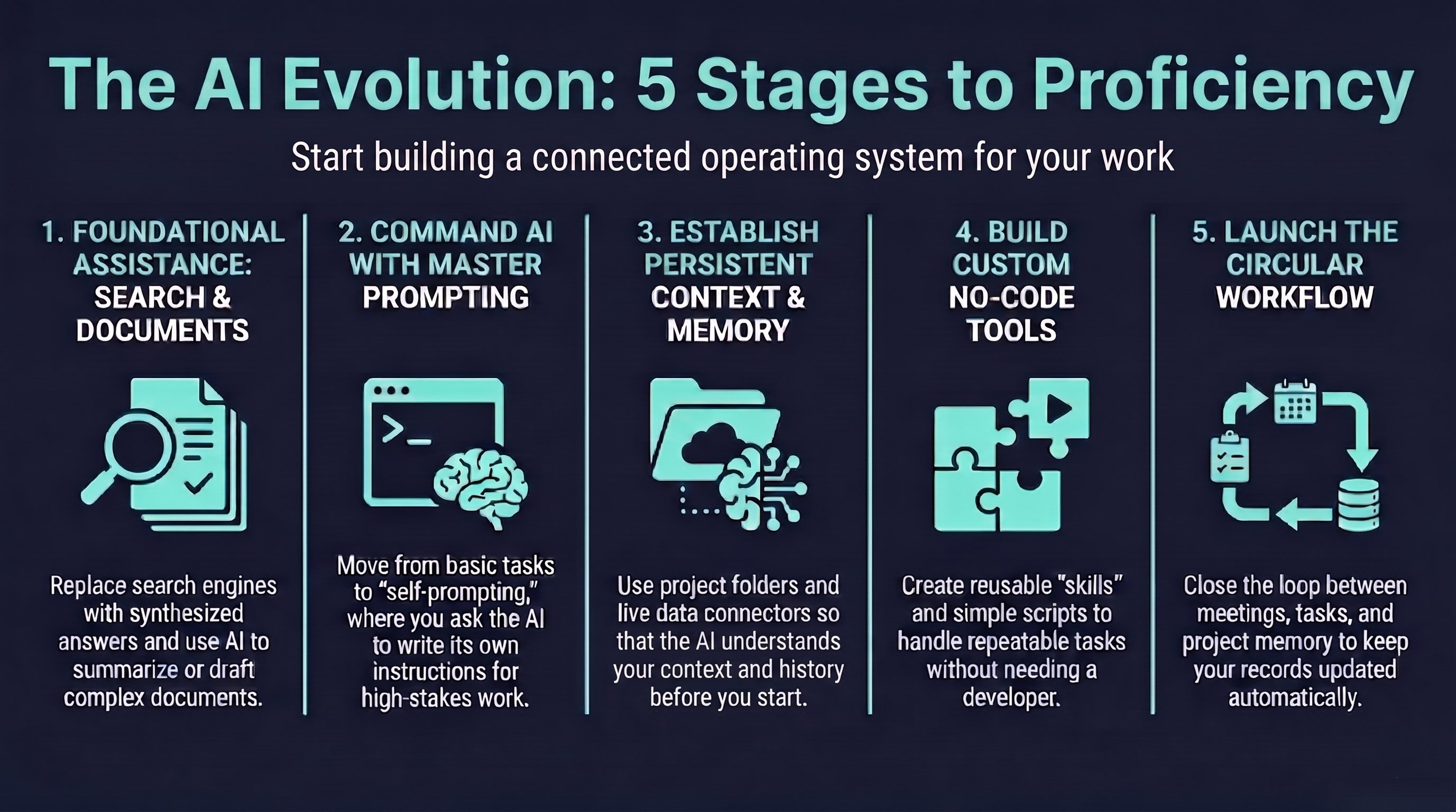
Stage One
Foundational Assistance: Search and Documents
What changes: the answer is synthesized for you rather than pointing you toward a source you still have to read and interpret. You get the answer — not ten links that might contain it.
Good uses at Stage 1:
- Quick definitions and explanations of unfamiliar terms.
- Comparing two options — ask "what is the difference between X and Y" in plain language.
- Plain-English summaries of complex topics or research questions that would normally require reading multiple sources.
- Build the daily habit of reaching for AI first. Fluency at every later stage depends on it.
Typing short keyword fragments, the way you would into a search engine. AI works better with full sentences and real context. Write the way you would ask a knowledgeable colleague.
Use it for the next thing you would have Googled. Notice the difference in how the answer comes back.
Document Work
Once you are comfortable with Q&A, the next step is working with actual documents. Paste in text, upload files, or give it a draft you have already written. Ask it to summarize, edit, reformat, or analyze. This is where AI starts saving real time.
- Summarize long documents, reports, or articles in seconds.
- Draft emails, memos, and updates from bullet points you provide.
- Improve and polish writing you have already drafted.
- Extract key points, action items, or decisions from meeting notes.
- Reformat content from one structure to another.
Upload a 40-page RFP and ask: "What are the five most important evaluation criteria? What is the submission deadline? Summarize the scope of work in plain language." You get structured answers in under a minute.
Stage Two
Command AI with Master Prompting
What changes: the quality of what AI gives you is directly tied to the quality of what you ask. Getting better at prompting is the single highest-leverage skill you can develop at this stage.
The basic prompt upgrade
Most people start with something like: "Write me a proposal for a bridge construction project." That works, but the output is generic. A better prompt gives it three things:
| Element | What it does | Example |
|---|---|---|
| Role | Tells AI what perspective to take | You are a senior project manager with infrastructure experience |
| Task + context | Specifies what to produce and why | Write a two-page proposal for a city bridge retrofit covering drainage and structural assessment |
| Format | Defines the structure of the output | Use section headers: Executive Summary, Scope, Timeline, Deliverables |
Advanced Prompting
Advanced prompting is the same skill taken further. The more specific you are about role, constraints, audience, tone, and output format, the more useful the result. At this stage you stop editing bad output and start refining good output.
You are a senior communications consultant. Your task is to draft an internal memo announcing a new project approval process to a team of 30 project managers. The tone should be clear and direct, not corporate. The memo should be under 400 words, use short paragraphs, and end with a bulleted list of three next steps. Do not use the words "leverage," "synergy," or "robust."
This prompt specifies role, audience, tone, length, structure, and explicit exclusions. Each constraint removes a degree of freedom that would otherwise produce generic output. Other useful constraints:
- Audience: who will read this and what they already know.
- Length: word count, number of bullets, number of pages.
- Tone: formal, direct, conversational, technical.
- Exclusions: words, phrases, or approaches to avoid.
- Format: headers, tables, numbered steps, plain prose.
Write your prompt, then read it as if you were the AI. What is ambiguous? Fix that before sending.
Self-Prompting
Instead of spending time crafting the perfect prompt yourself, describe the task in plain language and ask AI to generate its own prompt — and to ask you for whatever information it needs to do the job well. This is the most underused technique in AI work.
Based on what I just described, draft the best possible prompt for this task. Then ask me for any additional information you need before you begin.
AI systems have processed an enormous amount of information about how to structure tasks and what good prompts look like. They are, in a straightforward sense, better at prompt engineering than most humans. Using that capability to write your prompt — rather than just execute it — is a simple but significant upgrade.
Use self-prompting for any high-stakes deliverable: proposals, executive summaries, strategic memos.
Stage Three
Establish Persistent Context and Memory
What changes: every AI conversation starts fresh by default. Context management is the practice of solving this systematically — so you are not re-explaining the same background every time.
The Projects approach
Claude and ChatGPT both support a Projects feature. You create a project for each client, engagement, or work area, upload the relevant documents, and all chats within that project reference that material automatically.
What to load into a project:
- Project or engagement overview.
- Key documents: plans, scopes, org charts, prior deliverables.
- Client background and context.
- Decisions made and directions agreed on.
- Your preferences for tone, format, and structure.
Chats within a project share the same documents but do not share each other's conversation history. Keep your project files updated with any major decisions so every chat stays current.
Connectors and live data
In addition to static documents, Claude supports connectors that link directly to external platforms: Google Calendar, Gmail, Granola, Slack, Asana, and others. These connectors mean that instead of uploading a snapshot of your data, AI can query the live version.
- Pull open Asana tasks into a conversation without copy-pasting them.
- Reference a recent Granola meeting transcript directly from the context window.
- Check calendar availability when drafting a project timeline.
- Search Slack history for a prior decision without leaving the AI interface.
With connectors active, AI starts from current data rather than from whatever you remembered to upload. Context management becomes less about manual file maintenance and more about configuring the right connections once.
Stage Four
Build Custom No-Code Tools
What changes: you stop explaining the same process repeatedly and start building reusable tools that handle it for you — without writing code. You also ask AI to write code on your behalf, to build simple functional tools that solve real problems in your work.
What kinds of tools are realistic
- Dashboard that reads a spreadsheet and visualizes workload or project status.
- Form that collects structured input and generates a formatted output.
- Script that extracts and summarizes content from a video or document.
- Tracker that organizes project data and highlights what needs attention.
- Template generator that produces customized documents from standard inputs.
What skills add
A skill is a reusable instruction set stored in a project or workspace. Instead of re-explaining how to run a process each time, you write the logic once and reference it in any conversation. THAMPICO has built skills for meeting processing, project memory management, Asana task sync, executive report generation, and writing quality checks.
The value of skills is consistency. Any conversation that invokes a skill follows the same extraction logic, produces the same output format, and proposes the same types of updates. The output improves as the skill improves, without any change to how AI is prompted in each conversation.
A developer would charge thousands of dollars and weeks of calendar time to build what you can now produce in an afternoon. The tools are simpler, but for internal use cases they are often exactly what is needed.
The examples here use the THAMPICO tool stack — Asana, Claude, Granola. The underlying approach works with whatever platforms your team already uses. The skill and automation patterns apply regardless of which specific tools you choose.
Stage Five
Launch the Circular Workflow
What changes: the individual capabilities from earlier stages combine into a connected operating pattern. A circular workflow is a recurring coordination cycle in which each meeting produces a structured project record, and that record becomes the starting point for the next meeting.
The problem it solves
Most recurring coordination workflows fail because the meeting and the project record operate as separate systems. The team talks through the work in one place, but the durable record lives somewhere else — in Asana, email, a shared folder, or a manager's notes. The circular workflow closes that gap.
After a meeting, AI processes the transcript, extracts decisions and action items, pushes updates to Asana, and refreshes the project record. Before the next meeting, AI pulls the current state of that record to generate the agenda. The team stops reconstructing status from memory and starts each conversation from the latest known state.
How the loop works
| Step | Input | Action | Output | Value created |
|---|---|---|---|---|
| 1. Start | Latest project record | Pull current state into the agenda | Agenda grounded in facts | Team starts from data, not memory |
| 2. Capture | Meeting discussion | Record what happens in real time | Raw transcript or notes | No context gets dropped |
| 3. Process | Raw transcript | AI extracts decisions, tasks, risks, open items | Structured summary | Signal separated from noise |
| 4. Update | Structured summary | Push tasks, owners, due dates, decisions to Asana | Updated project record | Status becomes a byproduct of work |
| 5. Deploy | Updated record | Generate next agenda, briefing, or escalation | Next meeting package | Next cycle starts from current state |
Implementation approach
- Start with one recurring meeting where status reconstruction is painful and visible.
- Define the system of record before designing the loop — Asana or a comparable task manager must be the durable record.
- Standardize what gets extracted: decisions, action items, owners, due dates, risks, dependencies, and open questions.
- Generate the next agenda from the updated record, not from a blank template.
- Add outer layers (team and management reporting) only after the meeting loop works reliably.
Measure the before and after in concrete terms: meeting preparation time, time spent reconstructing last week's status, number of dropped follow-ups, and how long it takes to brief a new team member.
The circular workflow here is built around Asana, Granola, and Claude. The loop pattern itself — capture, process, update, deploy — works with any task management and transcription tools your team already uses.
Bonus
Capturing Meetings Automatically
Regardless of which stage you are at, meeting transcription deserves special mention. Granola runs in the background during any call, transcribes in real time, and exports transcripts that can be fed directly into AI platforms for processing.
- No setup required per meeting — it detects calls automatically.
- Works across platforms: Zoom, Teams, Google Meet, and in-person calls.
- Exports directly into Claude or ChatGPT for structured note generation.
When a meeting ends, the Granola transcript feeds into Claude's meeting processor skill. Claude extracts decisions, action items, open questions, and risks, then proposes Asana task updates for your review. A one-hour meeting becomes a clean project update in under two minutes.
Recording laws vary by jurisdiction. In many U.S. states, one-party consent applies to transcription for personal note-taking, but two-party or all-party consent laws exist in others. Know the rules for your state or context before relying on this in client or external meetings.
The one thing to try today
Open Claude or ChatGPT. Describe the next deliverable you need to produce.
Then type: "Based on what I just described, write the best prompt for this task and ask me for any information you need." See what comes back.